Your online safety depends on more than just strong passwords. Every click you make, every file you download, and every device you use can open doors to cyber threats.
But what if you could take simple, effective steps to protect yourself and your data? This guide on Cybersecurity Best Practices will show you how to stay one step ahead of hackers and keep your digital life secure. Keep reading to discover easy actions you can start today that will make a big difference in your online safety.
Credit: www.bizstim.com
Strong Passwords
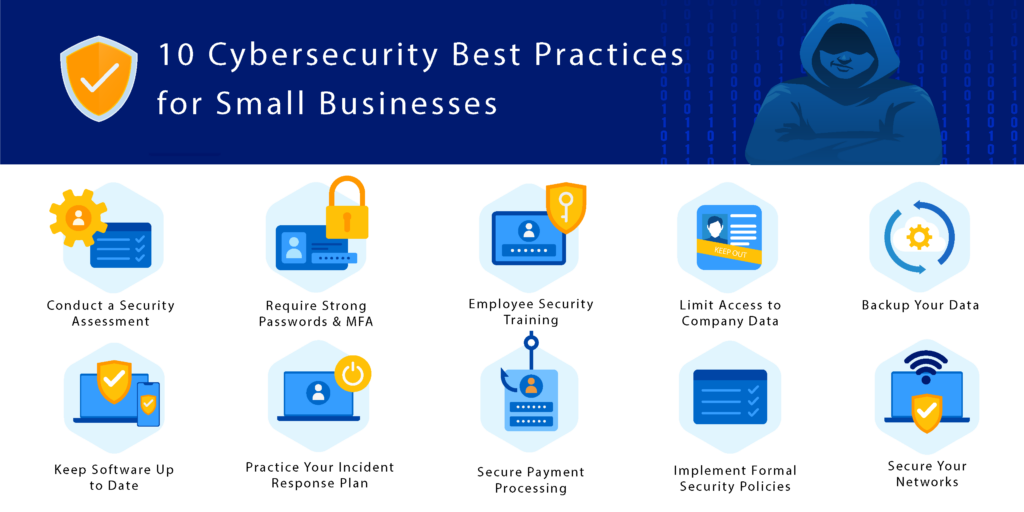
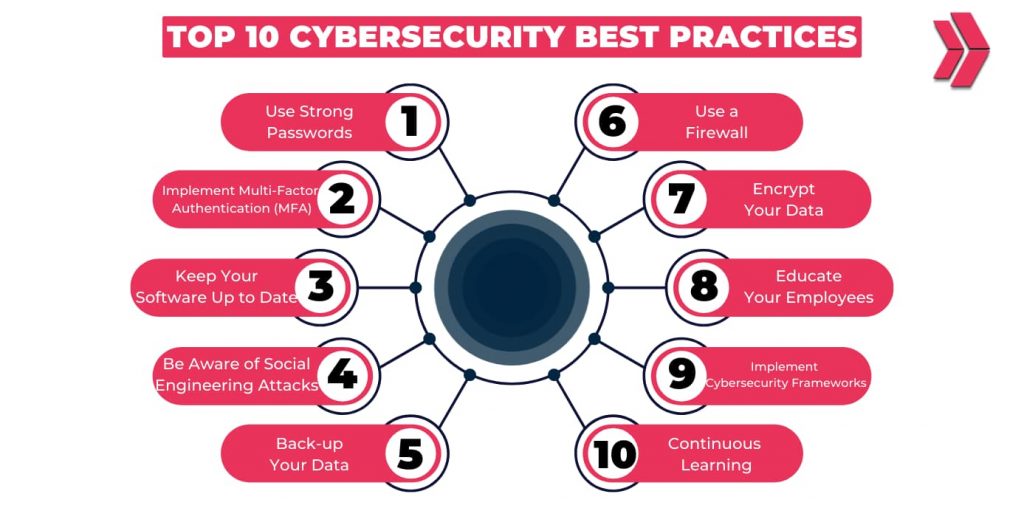
Complex passwords use letters, numbers, and symbols. They should be at least 12 characters long. Avoid common words or easy patterns like “1234” or “password”. Mixing uppercase and lowercase letters makes passwords harder to guess.
Password managers help store and create strong passwords. They keep all passwords safe in one place. This way, there is no need to remember every password. Password managers can fill in passwords automatically on websites.
Passwords must be changed often. Updating passwords regularly helps stop hackers from using old passwords. Set reminders to change passwords every few months. Never reuse the same password on different sites.
Credit: www.psmpartners.com
Multi-factor Authentication
Multi-Factor Authentication (MFA) adds extra layers to protect accounts. It needs two or more proofs to allow access. This makes it very hard for hackers to break in.
Benefits of MFA include stronger security and less chance of theft. It stops many common attacks like stolen passwords. Users feel safer using MFA for their accounts.
| Type of MFA | Description |
|---|---|
| SMS Codes | Receive a code on your phone to enter. |
| Authenticator Apps | Apps like Google Authenticator give time-based codes. |
| Biometrics | Use fingerprint or face scans to confirm identity. |
| Security Tokens | Physical devices that generate login codes. |
Implementing MFA is easy. First, check if your service supports it. Then, choose the type that fits your needs. Lastly, follow setup steps carefully to enable MFA.
Software Updates
Software updates fix security holes and bugs. They keep devices safe from attacks. Updates also add new features and improve performance. Skipping updates can leave your system vulnerable to hackers.
Automating patch management saves time and ensures updates are applied quickly. It reduces human error and keeps software always current. Many tools can check and install patches without stopping work.
Legacy systems are old devices or software that no longer get updates. They can be easy targets for cyber threats. Special care is needed, like isolating these systems or using extra security measures.
Secure Networks
VPNs create a secure tunnel for your internet connection. This helps keep your data private and safe from hackers. Using a VPN is important, especially on public networks.
Public Wi-Fi can expose your device to risks. Avoid accessing banking or personal accounts on these networks. If necessary, always use a VPN to stay protected.
| Network Monitoring Tool | Purpose | Benefit |
|---|---|---|
| Firewalls | Blocks unauthorized access | Keeps network safe from attacks |
| Intrusion Detection Systems | Detects suspicious activity | Alerts for quick response |
| Traffic Analyzers | Monitors network data | Helps find weak points |
Data Encryption
Encrypting data at rest keeps information safe on devices. It stops thieves from reading files if they steal a computer or phone. Strong encryption makes data look like random letters and numbers. Only users with keys can unlock it. This method protects personal info and business secrets.
Encrypting data in transit secures information sent over the internet. It stops hackers from spying on messages or stealing passwords. Common tools like SSL/TLS create a secure path between devices. This keeps data private during emails, web browsing, and online banking.
Choosing encryption tools depends on needs and skills. Look for tools with strong algorithms like AES or RSA. Easy-to-use software helps avoid mistakes. Open-source options let users check security themselves. Regular updates keep tools safe from new threats.
Backup Strategies
Backing up data often is very important. Create a regular backup schedule to avoid data loss. Set specific times to save your files, like daily or weekly. This keeps your data safe from accidents or attacks.
Use offsite and cloud backups to protect data from physical damage. Store copies in different places, away from your main computer. Cloud services let you access files from anywhere. This helps if your local backup is lost.
Always test backup restorations. Check if your saved files can be recovered easily. Testing shows if backups work well and if files are not broken. It is better to find problems early than lose important data.
Phishing Awareness
Phishing attempts often look like real emails from trusted sources. They may ask for personal information or direct you to fake websites. Watch for spelling mistakes, strange email addresses, and urgent requests. Never click links or download attachments unless you are sure they are safe.
Training and simulations help people practice spotting phishing emails. Regular exercises make it easier to recognize threats. These sessions teach what signs to look for and how to respond quickly and safely.
Reporting suspicious emails is very important. Tell your IT team or supervisor right away. This helps protect others and stops attacks before they spread. Quick reporting keeps your network and data secure.
Access Controls
Role-Based Access means giving users only the permissions they need. This helps keep important data safe. People get access based on their job roles, so no one can see too much.
The Least Privilege Principle limits user permissions to the bare minimum. This lowers the risk of mistakes or attacks. Users only do what is needed for their tasks.
Monitoring Access Logs tracks who accessed what and when. It helps spot unusual activity fast. Regular checks on logs can stop threats before damage happens.
Device Security
Mobile devices hold much personal data. Protect them with strong passwords or biometrics. Always keep the device’s software updated. Updates fix security holes.
Antivirus software helps stop viruses and malware. Choose software that updates automatically. Run scans often to keep devices clean. Avoid downloading apps from unknown sources.
Physical security is key. Never leave devices unattended in public places. Use lock screens to stop others from accessing data. Store devices safely when not in use.
Incident Response
Preparing response plans helps teams act fast during cyber attacks. These plans list clear steps to follow. Everyone must know their role to avoid confusion. Plans should be tested often to find any weak spots.
Identifying breaches quickly saves time and stops damage. Watch for unusual activities like strange emails or slow computers. Use tools that alert the team when something looks wrong. The faster a breach is found, the less harm it can cause.
Recovery and reporting focus on fixing problems and telling the right people. Back up data regularly to make recovery easier. After an attack, report details to authorities and affected users. This helps prevent future attacks and keeps trust strong.
Credit: clarusway.com
Frequently Asked Questions
What Are The Top Cybersecurity Best Practices?
Top cybersecurity best practices include using strong passwords, enabling two-factor authentication, regularly updating software, and backing up data. Avoid clicking unknown links and educate yourself on phishing attacks. Consistently monitoring your network also helps detect threats early and protect sensitive information effectively.
How Can I Protect My Personal Data Online?
Protect personal data by using encrypted connections like VPNs and HTTPS websites. Avoid sharing sensitive info on social media. Use strong, unique passwords and enable multi-factor authentication. Regularly review privacy settings and be cautious about app permissions to minimize data exposure risks.
Why Is Software Updating Crucial For Cybersecurity?
Software updates fix security vulnerabilities and patch bugs that hackers exploit. Regular updates keep your system protected from the latest threats. Ignoring updates increases the risk of cyberattacks. Always enable automatic updates to ensure your software stays secure and runs efficiently.
What Role Does Employee Training Play In Cybersecurity?
Employee training reduces human error, the leading cause of breaches. It teaches staff to identify phishing, use secure passwords, and follow protocols. Well-informed employees act as the first line of defense, strengthening overall organizational cybersecurity and minimizing risks from social engineering attacks.
Conclusion
Staying safe online needs simple, smart steps every day. Use strong passwords and change them often. Keep your software updated to block new threats. Be careful with emails and links you don’t trust. Back up your important files regularly to avoid loss.
These small actions protect your data and privacy. Cybersecurity is a shared job. Everyone must stay alert to stay secure. Start practicing these tips today for safer online use. Your safety online depends on your actions now.